PHP-如何偵測使用者是否使用手機瀏覽

隨著智慧型手機的普及,在網頁的製作上都需考量到手機瀏覽器的部份,雖然最近很常提到的RWD(Responsive Web Design)可以解決,但實際上如果dom structure 過於肥大,或是載入 Javascript過多時,依舊會有頻寬上的問題(3G貴森森呀),尤其是圖片硬縮流量也不會變小XD

老實說responsive web design 也不是萬能的,祇是利用CSS手法隱藏不需要的elements,最好還是透過偵測方式,輸出不同html會比較好些。

這邊介紹一個很不錯的class

PHP Mobile Detect

網址:http://mobiledetect.net/

使用的方式也很簡單。

  1. include ‘Mobile_Detect.php’;
  2. $detect = new Mobile_Detect();
  3. // Check for any mobile device.
  4. if ($detect->isMobile())
  5. // Check for any tablet.
  6. if($detect->isTablet())
  7. // 3. Check for any mobile device, excluding tablets.
  8. if ($detect->isMobile() && !$detect->isTablet())
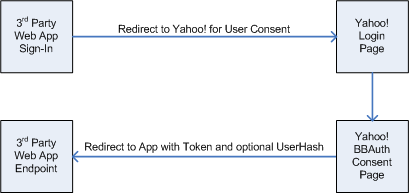
 

重新上傳Yahoo Browser-Based Authentication (BBAuth) PHP Quickstart

昨天在寫登入功能的時候,順手在GitHub上面上傳了Y!BBAuth之前的Qucikstart PHP程式碼。原來在官方網站上面的連結都不見了!幸好當時有保留下來,雖然說現在大家都習慣用OpenID or Oauth,不過BBAuth真的蠻簡單上手就是了~

GitHub位置: https://github.com/superlevin/bbauth_quickstart

註冊步驟

1.BBAuth registration page

2.填寫資料如下

Authentication method => Browser Based Authentication
Developer/Company Name => 開發者 或 公司名字
Product name      => 產品名稱
Web Application URL  => 產品網址, ex: http://example.com/
BBAuth Success URL   => 登入完成後要導去哪個網址, ex: http://example.com/
Contact email     => 你的連絡信箱
Phone number      => 手機號碼
Description of appliccation => 描述
Required access scopes => 選 Single Sign On, No user data can be accessed

填寫完後按 Continue

3.出現下面的訊息

Phrase: “# her sailed we the noon fixed till quietly onhad ocean to” File: “bbauth.html” Url to Check: “http://example.com/bbauth.html

將上面訊息貼到記事本後,另存成 File 裡的檔案名稱,上傳到網站作驗證。點選 Check Domain ,成功的話就會看到 Result: Pass。再按 Continue

4.接著就可以得到 Application ID 跟 Shared Secret