PHPStorm 2017版本支援最新的php測試框架PHPUnit6,並針對PHPUnit 6的特性做相關的支援以及調整,而這個版本將會在PHPStorm 2017發佈。除此之外,也新增了PHPUnit6的文件模板~

大型網站架構..net 架構師.rabbitMQ.redis.行動開發.APP開發教學.PHP Laravel開發..net core C# 開發.架構師之路.Delphi開發.資料庫程式.進銷存.餐飲POS系統
PHPStorm 2017版本支援最新的php測試框架PHPUnit6,並針對PHPUnit 6的特性做相關的支援以及調整,而這個版本將會在PHPStorm 2017發佈。除此之外,也新增了PHPUnit6的文件模板~
composer create-project laravel/laravel blog
use Illuminate\Support\Facades\Schema;  //這一行新增

public function boot()
{
   Schema::defaultStringLength(191); //這一行新增
}
'timezone' => 'Asia/Taipei',
DB_CONNECTION=mysql
DB_HOST=127.0.0.1
DB_PORT=3306
DB_DATABASE=blog
DB_USERNAME=root
DB_PASSWORD=
php artisan migrate
php artisan make:auth
php artisan make:model –migration Post
    Schema::create('posts', function (Blueprint $table) {
        $table->increments('id');
        $table->string('title');
        $table->text('body')->nullable();
        $table->integer('user_id');
        $table->timestamps();
    });
php artisan migrate
php artisan make:seeder PostSeeder
public function run()
{
    DB::table('posts')->delete();

    for ($i=0; $i < 10; $i++) {
        \App\Post::create([
            'title'   => 'Title '.$i,
            'body'    => 'Body '.$i,
            'user_id' => 1,
        ]);
    }
}
public function run()
{
    // $this->call(UsersTableSeeder::class);
    $this->call(PostSeeder::class);
}
composer dump-autoload

php artisan db:seed
public function index()
{
    //return view('home');
    return view('home')->withPosts(\App\Post::all());
}
1 將Blog Home模板解壓縮
2 css、font、js目錄移至public資料夾
3 home.blade.php修改如下
<!DOCTYPE html>
<html lang="en">
<head>
<meta charset="utf-8">
<meta http-equiv="X-UA-Compatible" content="IE=edge">
<meta name="viewport" content="width=device-width, initial-scale=1">
<meta name="description" content="">
<meta name="author" content="">
<title>部落格</title>
<!-- Bootstrap Core CSS -->
<link href="css/bootstrap.min.css" rel="stylesheet">
<!-- Custom CSS -->
<link href="css/blog-home.css" rel="stylesheet">
<!-- HTML5 Shim and Respond.js IE8 support of HTML5 elements and media queries -->
<!-- WARNING: Respond.js doesn't work if you view the page via file:// -->
<!--[if lt IE 9]>
<script src="https://oss.maxcdn.com/libs/html5shiv/3.7.0/html5shiv.js"></script>
<script src="https://oss.maxcdn.com/libs/respond.js/1.4.2/respond.min.js"></script>
<![endif]-->
</head>
<body>
<!-- Navigation -->
<nav class="navbar navbar-inverse navbar-fixed-top" role="navigation">
<div class="container">
<!-- Brand and toggle get grouped for better mobile display -->
<div class="navbar-header">
<button type="button" class="navbar-toggle" data-toggle="collapse" data-target="#bs-example-navbar-collapse-1">
<span class="sr-only">Toggle navigation</span>
<span class="icon-bar"></span>
<span class="icon-bar"></span>
<span class="icon-bar"></span>
</button>
<a class="navbar-brand" href="#">部落格</a>
</div>
<!-- Collect the nav links, forms, and other content for toggling -->
<div class="collapse navbar-collapse" id="bs-example-navbar-collapse-1">
<ul class="nav navbar-nav">
<!-- Authentication Links -->
@if (Auth::guest())
<li><a href="{{ url('/login') }}">登入</a></li>
<li><a href="{{ url('/register') }}">註冊</a></li>
@else
<li class="dropdown">
<a href="#" class="dropdown-toggle" data-toggle="dropdown" role="button" aria-expanded="false">
{{ Auth::user()->name }} <span class="caret"></span>
</a>
<ul class="dropdown-menu" role="menu">
<li><a href="{{ url('/logout') }}"><i class="fa fa-btn fa-sign-out"></i>登出</a></li>
</ul>
</li>
@endif
</ul>
</div>
<!-- /.navbar-collapse -->
</div>
<!-- /.container -->
</nav>
<!-- Page Content -->
<div class="container">
<div class="row">
<!-- Blog Entries Column -->
<div class="col-md-12">
<h1 class="page-header">
部落格
<small>文章列表</small>
</h1>
<!-- First Blog Post -->
@foreach ($posts as $post)
<h2>
<a href="#">{{ $post->title }}</a>
</h2>
<p class="lead">
作者: <a href="index.php">{{ $post->user_id }}</a>
</p>
<p><span class="glyphicon glyphicon-time"></span> 建立日期: {{ $post->created_at }}</p>
<p>{{ $post->body }}</p>
<a class="btn btn-primary" href="#">讀取更多 <span class="glyphicon glyphicon-chevron-right"></span></a>
<hr>
@endforeach
</div>
</div>
<!-- /.row -->
<hr>
<!-- Footer -->
<footer>
<div class="row">
<div class="col-lg-12">
<p>Copyright © 林壽山 2017</p>
</div>
<!-- /.col-lg-12 -->
</div>
<!-- /.row -->
</footer>
</div>
<!-- /.container -->
<!-- jQuery -->
<script src="js/jquery.js"></script>
<!-- Bootstrap Core JavaScript -->
<script src="js/bootstrap.min.js"></script>
</body>
</html>
Auth::routes();
Route::get('/', 'HomeController@index');
Route::get('/logout', 'Auth\LoginController@logout');
Route::get('/home', 'HomeController@index');
php artisan make:controller PostController
public function show($id)
{
    return view('post/show')->withPosts(\App\Post::find($id));
}
Route::get('post/{id}', 'PostController@show');
<!DOCTYPE html>
<html lang="en">
<head>
<meta charset="utf-8">
<meta http-equiv="X-UA-Compatible" content="IE=edge">
<meta name="viewport" content="width=device-width, initial-scale=1">
<meta name="description" content="">
<meta name="author" content="">
<title>部落格</title>
<!-- Bootstrap Core CSS -->
<link href="/css/bootstrap.min.css" rel="stylesheet">
<!-- Custom CSS -->
<link href="/css/blog-home.css" rel="stylesheet">
<!-- HTML5 Shim and Respond.js IE8 support of HTML5 elements and media queries -->
<!-- WARNING: Respond.js doesn't work if you view the page via file:// -->
<!--[if lt IE 9]>
<script src="https://oss.maxcdn.com/libs/html5shiv/3.7.0/html5shiv.js"></script>
<script src="https://oss.maxcdn.com/libs/respond.js/1.4.2/respond.min.js"></script>
<![endif]-->
</head>
<body>
<!-- Navigation -->
<nav class="navbar navbar-inverse navbar-fixed-top" role="navigation">
<div class="container">
<!-- Brand and toggle get grouped for better mobile display -->
<div class="navbar-header">
<button type="button" class="navbar-toggle" data-toggle="collapse" data-target="#bs-example-navbar-collapse-1">
<span class="sr-only">Toggle navigation</span>
<span class="icon-bar"></span>
<span class="icon-bar"></span>
<span class="icon-bar"></span>
</button>
<a class="navbar-brand" href="{{ url('/') }}">部落格</a>
</div>
<!-- Collect the nav links, forms, and other content for toggling -->
<div class="collapse navbar-collapse" id="bs-example-navbar-collapse-1">
<ul class="nav navbar-nav">
<!-- Authentication Links -->
@if (Auth::guest())
<li><a href="{{ url('/login') }}">登入</a></li>
<li><a href="{{ url('/register') }}">註冊</a></li>
@else
<li class="dropdown">
<a href="#" class="dropdown-toggle" data-toggle="dropdown" role="button" aria-expanded="false">
{{ Auth::user()->name }} <span class="caret"></span>
</a>
<ul class="dropdown-menu" role="menu">
<li><a href="{{ url('/logout') }}"><i class="fa fa-btn fa-sign-out"></i>登出</a></li>
</ul>
</li>
@endif
</ul>
</div>
<!-- /.navbar-collapse -->
</div>
<!-- /.container -->
</nav>
<!-- Page Content -->
<div class="container">
<div class="row">
<!-- Blog Post Content Column -->
<div class="col-lg-8">
<!-- Blog Post -->
<!-- Title -->
<h1>{{ $posts->title }}</h1>
<!-- Author -->
<p class="lead">
作者: <a href="#"> {{ $posts->user_id }}</a>
</p>
<hr>
<!-- Date/Time -->
<p><span class="glyphicon glyphicon-time"></span> 日期: {{ $posts->updated_at }}</p>
<!-- Post Content -->
<p> {{ $posts->body }}</p>
</div>
</div>
<!-- /.row -->
<hr>
<!-- Footer -->
<footer>
<div class="row">
<div class="col-lg-12">
<p>Copyright © 林壽山 2017</p>
</div>
<!-- /.col-lg-12 -->
</div>
<!-- /.row -->
</footer>
</div>
<!-- /.container -->
<!-- jQuery -->
<script src="/js/jquery.js"></script>
<!-- Bootstrap Core JavaScript -->
<script src="/js/bootstrap.min.js"></script>
</body>
</html>
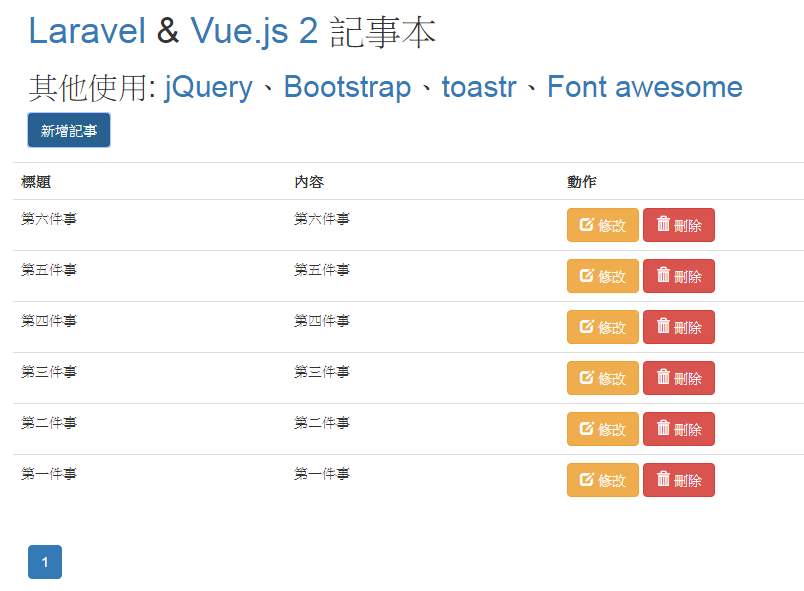
一、安裝Apache、MySQL、PHP環境
為了讓讀者能快速的撰寫程式,作者在Github上已經整理出一個適合開發Laravel的XAMPP環境。我們進到 https://github.com/superlevin/xamppforlaravel 點選 Clone or Download 後按 Download ZIP。

下載後,解壓縮到d:\xampp就可以運作了。執行 xampp-control 後,開啟相關服務即可。

 二、安裝 composer,到 https://getcomposer.org/download/ 下載Composer-Setup.exe。

安裝時,將PHP路徑指向D:\xampp\php.exe


三、進入終端機模式(開始→執行 cmd),然後設定php到系統變數
set PATH=%PATH%;d:\xampp\php
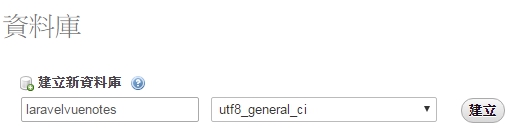
四、phpmyadmin建立資料庫
進入 http://localhost:8899/phpmyadmin 網頁
建立新資料庫 laravelvuenotes
五、透過composer 建立 laravel專案
dos指定切換 d:\xampp\htdocs\ 輸入
composer create-project laravel/laravel laravelvuenote

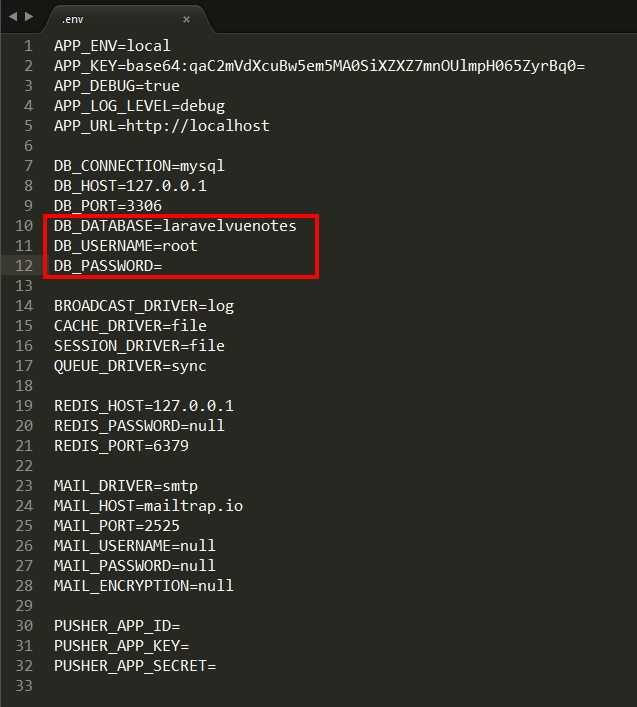
六、建立完成後,進入laravel專案修改.env設定
八、刪除migration中其他沒用的檔案(二個都刪除)

八、dos模式下建立 migration,切換至 d:\xampp\htdocs\laravelvuenote,輸入
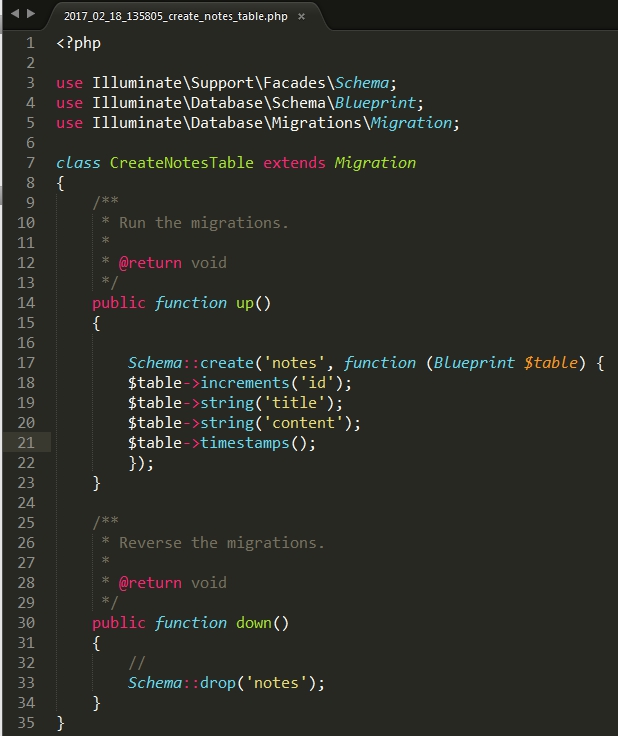
php artisan make:migration create_notes_table
修改laravelvuenote/database/migrations/XXXXX(日期)_xxxx(流水號)_create_notes_table.php
於up函數中加入
Schema::create('notes', function (Blueprint $table) {
$table->increments('id');
$table->string('title');
$table->string('content');
$table->timestamps();
});
於down函數中加入
Schema::drop('notes');
九、建立資料庫
dos模式下
php artisan migrate
十、新增model
dos模式下
php artisan make:model Note
十一、修改app\Note.php
<?php
namespace App;
use Illuminate\Database\Eloquent\Model;
class Note extends Model
{
  //
  protected $table ='notes';
  public $fillable = ['title','content'];
}
十二、建立controller
php artisan make:controller NoteController --resource
十三、修改app\Http\Controllers\NoteController.php
<?php

namespace App\Http\Controllers;

use Illuminate\Http\Request;

use App\Note;
use Validator;
use App\Http\Requests;
use Response;
use Illuminate\Support\Facades\Input;
class NoteController extends Controller
{
    public function api()
    {
      return view('/api');
    }
    /**
     * Display a listing of the resource.
     *
     * @return \Illuminate\Http\Response
     */
    public function index()
    {
        $notes = Note::latest()->paginate(6);  //每頁為6
        $response = [
          'pagination' => [
            'total' => $notes->total(),
            'per_page' => $notes->perPage(),
            'current_page' => $notes->currentPage(),
            'last_page' => $notes->lastPage(),
            'from' => $notes->firstItem(),
            'to' => $notes->lastItem()
          ],
          'data' => $notes
        ];
        return response()->json($response);
    }

    /**
     * Show the form for creating a new resource.
     *
     * @return \Illuminate\Http\Response
     */
    public function create()
    {
        //
    }

    /**
     * Store a newly created resource in storage.
     *
     * @param  \Illuminate\Http\Request  $request
     * @return \Illuminate\Http\Response
     */
    public function store(Request $request)
    {
        $this->validate($request,[
          'title' => 'required',
         'content' => 'required',
       ]);

        $create = Note::create($request->all());
        return response()->json($create);
    }

    /**
     * Display the specified resource.
     *
     * @param  int  $id
     * @return \Illuminate\Http\Response
     */
    public function show($id)
    {
        //
    }

    /**
     * Show the form for editing the specified resource.
     *
     * @param  int  $id
     * @return \Illuminate\Http\Response
     */
    public function edit($id)
    {
        //
    }

    /**
     * Update the specified resource in storage.
     *
     * @param  \Illuminate\Http\Request  $request
     * @param  int  $id
     * @return \Illuminate\Http\Response
     */
    public function update(Request $request, $id)
    {
      $this->validate($request,[
        'title' => 'required',
        'content' => 'required',
      ]);
      $edit = Note::find($id)->update($request->all());
      return response()->json($edit);
    }

    /**
     * Remove the specified resource from storage.
     *
     * @param  int  $id
     * @return \Illuminate\Http\Response
     */
    public function destroy($id)
    {
        Note::find($id)->delete();
        return response()->json(['done']);
    }
}
十四、修改routes\web.php
<?php
/*
|--------------------------------------------------------------------------
| Web Routes
|--------------------------------------------------------------------------
|
| Here is where you can register web routes for your application. These
| routes are loaded by the RouteServiceProvider within a group which
| contains the "web" middleware group. Now create something great!
|
*/
//Route::get('/', function () {
//    return view('welcome');
//});
Route::get('/', 'NoteController@api');
Route::get('/api', 'NoteController@index');
Route::resource('vuenotes','NoteController');
十五、建立頁面
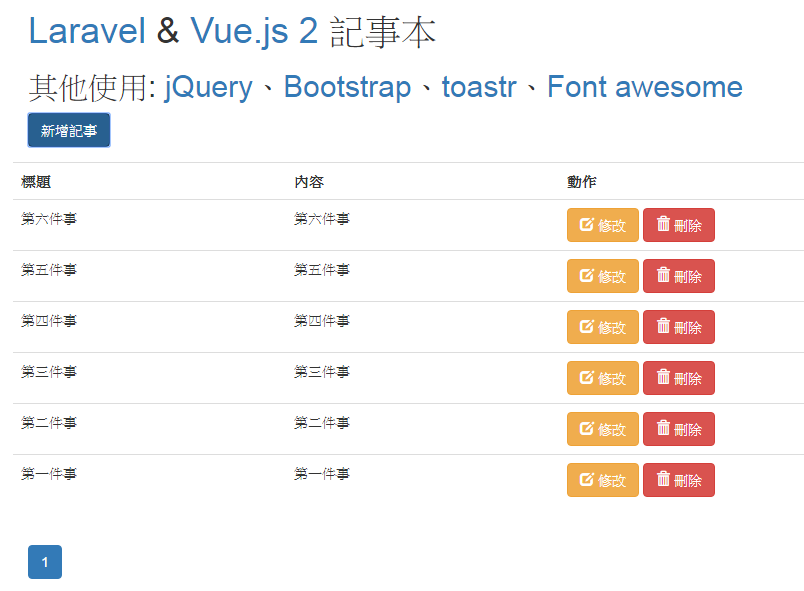
在這邊我們使用jQuery、Bootstrap、toastr、Font awesome以及Vue.js 2
在resources/views建立app.blade.php
<!DOCTYPE html>
<html lang="en">
  <head>
    <meta charset="utf-8">
    <meta http-equiv="X-UA-Compatible" content="IE=edge">
    <meta name="viewport" content="width=device-width, initial-scale=1">
    <!-- The above 3 meta tags *must* come first in the head; any other head content must come *after* these tags -->
    <title>Laravel & Vue2 記事本</title>
    <!-- Laravel CSRF-token check -->
    <meta id="token" name="token" value="{{ csrf_token() }}">
    <!-- HTML5 shim and Respond.js for IE8 support of HTML5 elements and media queries -->
    <!-- WARNING: Respond.js doesn't work if you view the page via file:// -->
    <!--[if lt IE 9]>
      <script src="https://oss.maxcdn.com/html5shiv/3.7.3/html5shiv.min.js"></script>
      <script src="https://oss.maxcdn.com/respond/1.4.2/respond.min.js"></script>
    <![endif]-->
  </head>
  <body>
    <div class="container" id="manage-note">
      @yield('content')
    </div>
    <!-- jQuery (necessary for Bootstrap's JavaScript plugins) -->
    <script src="https://ajax.googleapis.com/ajax/libs/jquery/3.1.1/jquery.min.js"></script>
    <!-- Latest compiled and minified CSS -->
    <link rel="stylesheet" href="https://maxcdn.bootstrapcdn.com/bootstrap/3.3.7/css/bootstrap.min.css" integrity="sha384-BVYiiSIFeK1dGmJRAkycuHAHRg32OmUcww7on3RYdg4Va+PmSTsz/K68vbdEjh4u" crossorigin="anonymous">
    <link rel="stylesheet" href="https://maxcdn.bootstrapcdn.com/font-awesome/4.7.0/css/font-awesome.min.css">

    <!-- Latest compiled and minified JavaScript -->
    <script src="https://maxcdn.bootstrapcdn.com/bootstrap/3.3.7/js/bootstrap.min.js" integrity="sha384-Tc5IQib027qvyjSMfHjOMaLkfuWVxZxUPnCJA7l2mCWNIpG9mGCD8wGNIcPD7Txa" crossorigin="anonymous"></script>
    <!-- vue.js -->
    <script type="text/javascript" src="//cdnjs.cloudflare.com/ajax/libs/vue/2.1.10/vue.min.js"></script>
    <script type="text/javascript" src="https://cdnjs.cloudflare.com/ajax/libs/vue-resource/1.0.3/vue-resource.min.js"></script>

    <script type="text/javascript" src="//cdnjs.cloudflare.com/ajax/libs/toastr.js/latest/toastr.min.js"></script>
    <link href="//cdnjs.cloudflare.com/ajax/libs/toastr.js/latest/toastr.min.css" rel="stylesheet">
    <!-- custom.js -->
    <script type="text/javascript" src="./js/note.js?v=zxcvxzcv"></script>
  </body>
</html>
接著新增檔案 api.blade.php
@extends('app')
@section('content')
 <div class="form-group row">
            <div class="col-md-12">
              <h1><a href="https://laravel.com/" target="_blank">Laravel</a> & <a href="https://vuejs.org/" target="_blank">Vue.js 2</a> 記事本</h1>
              <h2>其他使用: <a href="https://jquery.com/" target="_blank">jQuery</a>、<a href="http://getbootstrap.com/" target="_blank">Bootstrap</a>、<a href="http://codeseven.github.io/toastr/demo.html" target="_blank">toastr</a>、<a href="http://fontawesome.io/" target="_blank">Font awesome</a> </h2>
            </div>
            <div class="col-md-12">
              <button type="button" data-toggle="modal" data-target="#create-note" class="btn btn-primary">
                新增記事
              </button>
            </div>
          </div>
          <div class="row">
            <div class="table-responsive">
              <table class="table table-borderless">
                <tr>
                  <th>標題</th>
                  <th>內容</th>
                  <th>動作</th>
                </tr>
                <tr v-for="note in notes">
                  <td>@{{ note.title }}</td>
                  <td>@{{ note.content }}</td>
                  <td>
                    <button class="edit-modal btn btn-warning" @click.prevent="editnote(note)">
                      <span class="glyphicon glyphicon-edit"></span> 修改
                    </button>
                    <button class="edit-modal btn btn-danger" @click.prevent="deletenote(note)">
                      <span class="glyphicon glyphicon-trash"></span> 刪除
                    </button>
                  </td>
                </tr>
              </table>
            </div>
          </div>
          <nav>
            <ul class="pagination">
              <li v-if="pagination.current_page > 1">
                <a href="#" aria-label="Previous" @click.prevent="changePage(pagination.current_page - 1)">
                  <span aria-hidden="true">«</span>
                </a>
              </li>
              <li v-for="page in pagesNumber" v-bind:class="[ page == isActived ? 'active' : '']">
                <a href="#" @click.prevent="changePage(page)">
                  @{{ page }}
                </a>
              </li>
              <li v-if="pagination.current_page < pagination.last_page">
                <a href="#" aria-label="Next" @click.prevent="changePage(pagination.current_page + 1)">
                  <span aria-hidden="true">»</span>
                </a>
              </li>
            </ul>
          </nav>
          <!-- 新增對話框 -->
          <div class="modal fade" id="create-note" tabindex="-1" role="dialog" aria-labelledby="myModalLabel">
            <div class="modal-dialog" role="document">
              <div class="modal-content">
                <div class="modal-header">
                  <button type="button" class="close" data-dismiss="modal" aria-label="Close">
                    <span aria-hidden="true">×</span>
                  </button>
                  <h4 class="modal-title" id="myModalLabel">新增記事</h4>
                </div>
                <div class="modal-body">
                  <form method="post" enctype="multipart/form-data" v-on:submit.prevent="createnote">
                    <div class="form-group">
                      <label for="title">標題:</label>
                      <input type="text" name="title" class="form-control" v-model="newnote.title" />
                      <span v-if="formErrors['title']" class="error text-danger">
                        @{{ formErrors['title'] }}
                      </span>
                    </div>
                    <div class="form-group">
                      <label for="title">內容:</label>
                      <textarea name="content" class="form-control" v-model="newnote.content">
                      </textarea>
                      <span v-if="formErrors['content']" class="error text-danger">
                        @{{ formErrors['content'] }}
                      </span>
                    </div>
                    <div class="form-group">
                      <button type="submit" class="btn btn-success">儲存</button>
                    </div>
                  </form>
                </div>
              </div>
            </div>
          </div>
        <!-- 修改對話框 -->
        <div class="modal fade" id="edit-note" tabindex="-1" role="dialog" aria-labelledby="myModalLabel">
          <div class="modal-dialog" role="document">
            <div class="modal-content">
              <div class="modal-header">
                <button type="button" class="close" data-dismiss="modal" aria-label="Close">
                  <span aria-hidden="true">×</span>
                </button>
                <h4 class="modal-title" id="myModalLabel">修改記事</h4>
              </div>
              <div class="modal-body">
                <form method="post" enctype="multipart/form-data" v-on:submit.prevent="updatenote(fillnote.id)">
                  <div class="form-group">
                    <label for="title">標題:</label>
                    <input type="text" name="title" class="form-control" v-model="fillnote.title" />
                    <span v-if="formErrorsUpdate['title']" class="error text-danger">
                      @{{ formErrorsUpdate['title'] }}
                    </span>
                  </div>
                  <div class="form-group">
                    <label for="title">內容:</label>
                    <textarea name="content" class="form-control" v-model="fillnote.content">
                    </textarea>
                    <span v-if="formErrorsUpdate['content']" class="error text-danger">
                      @{{ formErrorsUpdate['content'] }}
                    </span>
                  </div>
                  <div class="form-group">
                    <button type="submit" class="btn btn-success">儲存</button>
                  </div>
                </form>
              </div>
            </div>
          </div>
        </div>
@stop
最後在public/js/下新增note.js
Vue.http.headers.common['X-CSRF-TOKEN'] = $("#token").attr("value");
new Vue({
  el :'#manage-note',
  data :{
    notes: [],
    pagination: {
      total: 0,
      per_page: 2,
      from: 1,
      to: 0,
      current_page: 1
    },
    offset: 4,
    formErrors:{},
    formErrorsUpdate:{},
    newnote : {'title':'','content':''},
    fillnote : {'title':'','content':'','id':''}
  },
  computed: {
    isActived: function() {
      return this.pagination.current_page;
    },
    pagesNumber: function() {
      if (!this.pagination.to) {
        return [];
      }
      var from = this.pagination.current_page - this.offset;
      if (from < 1) {
        from = 1;
      }
      var to = from + (this.offset * 2);
      if (to >= this.pagination.last_page) {
        to = this.pagination.last_page;
      }
      var pagesArray = [];
      while (from <= to) {
        pagesArray.push(from);
        from++;
      }
      return pagesArray;
    }
  },


         mounted: function () {

             this.getVuenote(this.pagination.current_page);
         },
  methods: {
    getVuenote: function(page) {
      this.$http.get('/vuenotes?page='+page).then((response) => {

        this.$set(this,'notes', response.data.data.data);
        this.$set(this,'pagination', response.data.pagination);
      });
    },
    createnote: function() {
      var input = this.newnote;
      this.$http.post('/vuenotes',input).then((response) => {
        this.changePage(this.pagination.current_page);
        this.newnote = {'title':'','content':''};
        $("#create-note").modal('hide');
        toastr.success('新增成功', '成功訊息', {timeOut: 5000});
      }, (response) => {
        this.formErrors = response.data;
      });
    },
    deletenote: function(note) {
      this.$http.delete('/vuenotes/'+note.id).then((response) => {
        this.changePage(this.pagination.current_page);
        toastr.success('刪除成功', '成功訊息', {timeOut: 5000});
      });
    },
    editnote: function(note) {
      this.fillnote.title = note.title;
      this.fillnote.id = note.id;
      this.fillnote.content = note.content;
      $("#edit-note").modal('show');
    },
    updatenote: function(id) {
      var input = this.fillnote;
      this.$http.put('/vuenotes/'+id,input).then((response) => {
        this.changePage(this.pagination.current_page);
        this.newnote = {'title':'','content':'','id':''};
        $("#edit-note").modal('hide');
        toastr.success('更新成功', '成功訊息', {timeOut: 5000});
      }, (response) => {
        this.formErrors = response.data;
      });
    },
    changePage: function(page) {
      this.pagination.current_page = page;
      this.getVuenote(page);
    }
  }
});
十六、開啟主機
php artisan serve
十七、完工
在Laravel設定排程的方式很簡單,只要先做好
* * * * * php /path/to/artisan schedule:run >> /dev/null 2>&1
* * * * * /usr/bin/php-cli /path/to/artisan schedule:run 1>> /dev/null 2>&1
if (empty($_GET) === false) {
    foreach ($_GET as $key => $value) {
        $_SERVER['argv'][] = $key;
    }
}
然後每分鐘都會去執行 app/Console/Kernel@schedule的內容
在後續的版本,還可以指定每小時跑之外,也可以指定每小時的幾分執行!
$schedule->command('task1')->hourlyAt(30);
$schedule->command('task1')
    ->weekdays()
    ->hourlyAt(30);
https://pascalbaljetmedia.com/en/blog/a-brief-overview-of-the-laravel-ecosystem
A brief overview of the Laravel Ecosystem 這篇文章是由國外Pascal Baljet所寫的文章,文章介紹了Laravel的框架、元件、開發環境、其他用途的套件以及官方的相關平台,很值得想深入理解框架的朋友。
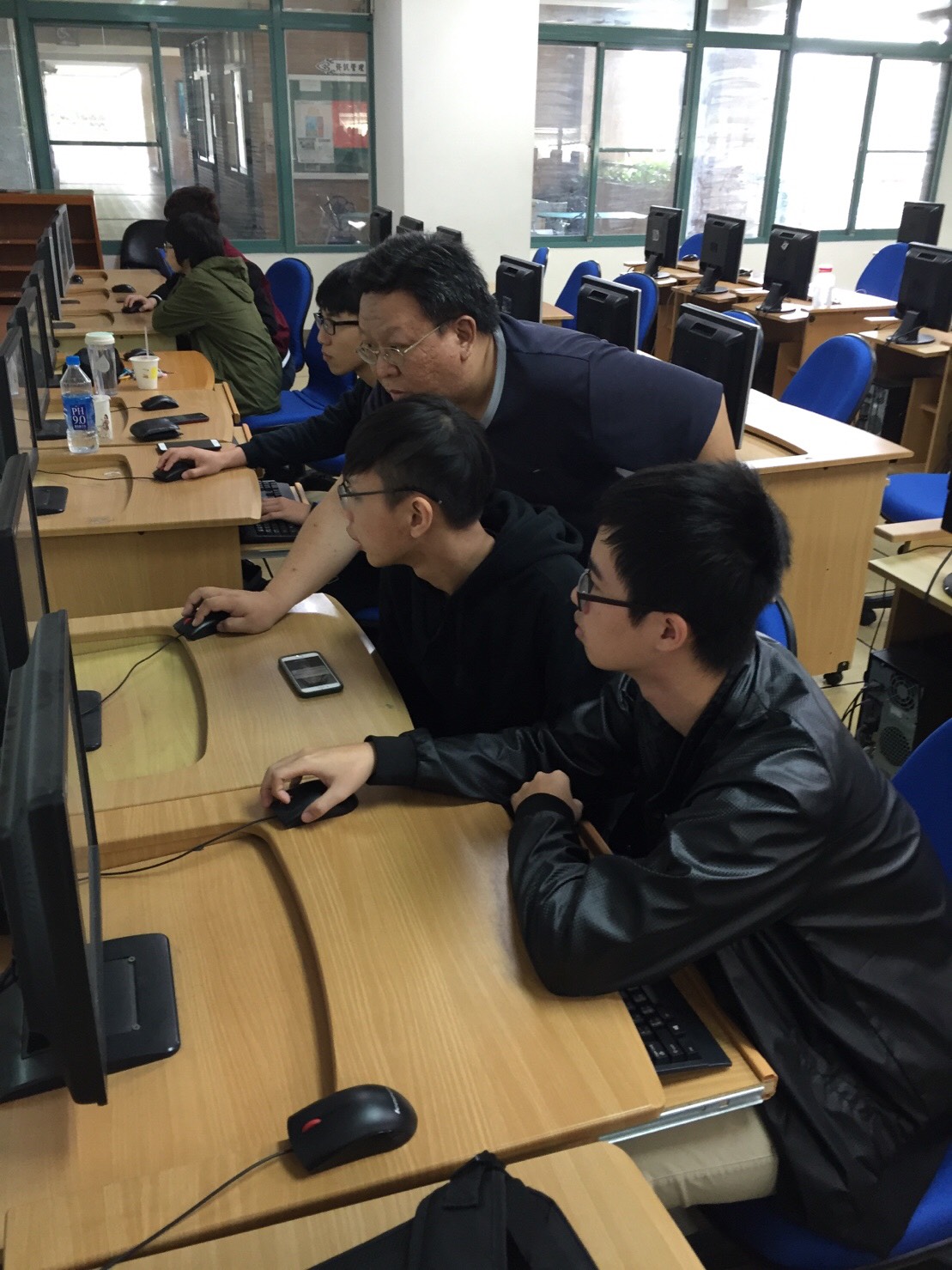
這學期的產業學院PHP課程,由之前的CodeIgniter改為Laravel課程,在上半學期主要以Route、MVC、Controller、DB…..為主軸,也就是以Laravel的基礎為主。同學在課程結束時,可以做基本的小範例。
在下學期則會更進階,並加上WebAPI的課程,讓同學可以結合手機程式一起做開發。
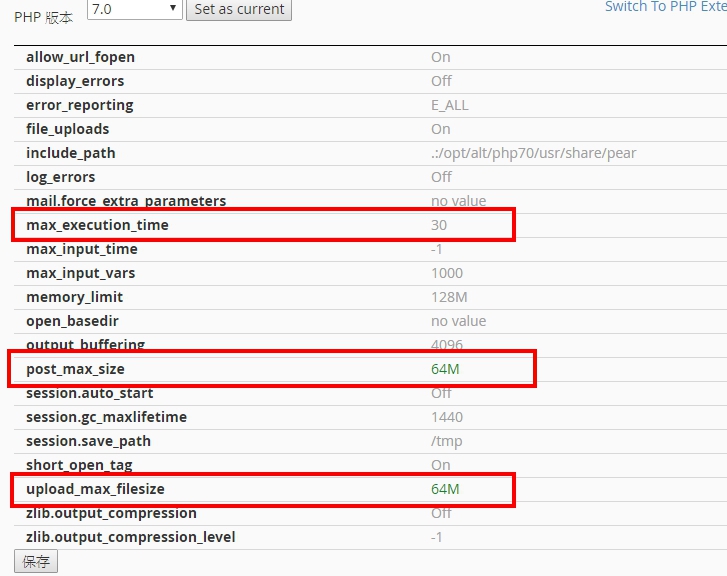
遠振主機中設定php上傳檔案限制的方式,
一、Cpanel選Select PHP Version
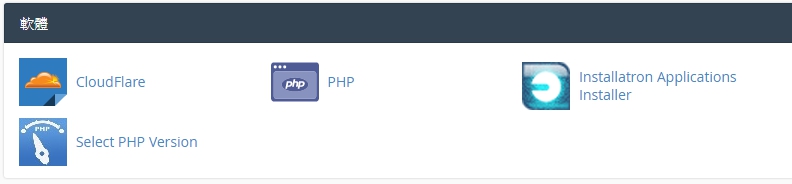
二、點選Switch to PHP Options
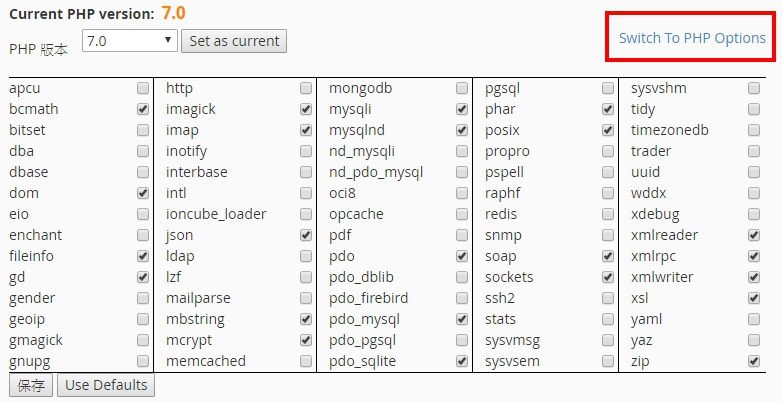
三、頁面可以設定PHP.ini的相關參數,設定完後按儲存即可


這學期教產業學院,捨去了CodeIgniter框架,而改用Laravel。也因為想找一本適合學生的課本,找了目前繁體/簡體書~但仍沒有好的教材。幸好最近看到了 Laravel Up&Running 這本書,就直接買下電子版苦讀一番,這週開始就開始以這本書為藍圖來做教學。希望能讓台灣的PHP教學環境更進步 🙂
任何一個網站框架最基本的功能就是透過http(s)取得客戶端的需求後並且回覆相關資訊,這意味著在學習框架中首要的是定義路由,如果沒有路由也就無法完成與客戶端互動。
在本章我們將瞭解Laravel的框架以及如何定義路由,並且熟悉如何使用Laravel的路由工具去處理各種路由的需求。
在Laravel的框架中,你可以透過 routes/web.php 定義 web相關的 routes,並透過 routes/api.php 定義 api相關的 routes。也就是說你可以將api與web做區隔建立對應的route。(如果是 5.3之前的版本,routes則存在 app/Http/routes.php中。)在這邊我們主要討論的是 web.php為主。
在web.php中有一個為根目錄(‘/’)且附帶閉包函數的預設路由。這個路由預設是使用者造訪根目錄時,就會回傳 welcome.blade.php 的內容。
1 2 3 | Route::get('/', function () {return view('welcome');}); |
除此之外,我們也可以不透過echo或print回傳字串。例如:
1 2 3 | Route::get('/', function () {return 'Hello World!';}); |
假設我們要設定一個回傳about的路由,可以透過
1 2 3 | Route::get('about', function () {return 'this is about!';}); |
或顯示 resource/views/about.blade.php
1 2 3 | Route::get('about', function () {return view('about');}); |
在HTTP通訊協定中制定了幾種動詞(Verbs)與伺服器溝通,在上一節中我們使用GET用來讀取資料。那其他PUT、POST、DELETE該如何定義?
1 2 3 4 5 | Route::post('/', function () {});Route::put('/', function () {});Route::delete('/', function () {}); |
如果要符合所有通詞,則使用any
1 | Route::any('/', function () {}); |
另外,要符合部分動詞,則使用match
1 | Route::match(['get', 'post'], '/', function () {}); |
如果要路由至特定的控制器(Controller),下面的例子會對應到 app/Http/Controllers/WelcomeController.php的index函數
1 | Route::get('/', 'WelcomeController@index'); |
如果你的路由需要傳遞參數的話,,該如何傳遞呢?
1 2 3 | Route::get('users/{id}', function ($id) {//}); |
如果傳遞的參數要有預設值的話,
1 2 3 | Route::get('users/{id}', function ($id='123') {//}); |
另外,參數也可以透過正規式讓裡頭的函數只能接收相 對應的值。
1 2 3 4 5 6 7 8 9 10 11 12 13 14 15 | // id只能輸入 0-9Route::get('users/{id}', function ($id) {//})->where('id', '[0-9]+');// username只能輸入大小寫的英文字母Route::get('users/{username}', function ($username) {//})->where('username', '[A-Za-z]+');// id只能輸入數字;slug只能輸入英文字母Route::get('posts/{id}/{slug}', function ($id, $slug) {Route Definitions | 27//})->where(['id' => '[0-9]+', 'slug' => '[A-Za-z]+']); |
在url Helper可以透過 url()去轉向,而在laravel框架中更允許你對每個路由做命名。
例如我們要顯示某一位會員的資料,可以先將會員資料做處理,
1 2 3 4 | // 定義members/ID為members.showRoute::get('members/{id}', 'MembersController@show')->name('members.show');// 在View<a href="<?php echo route('members.show', ['id' => 14]); ?>"> |
在Laravel裡有一個好用的路由群組,舉例來說,我有一個api相關的群組,一開始的定義可能如下:
1 2 3 4 5 6 | Route::get('/api', function () {});Route::get('/api/users', function () {}); |
我們透過路由群組可以簡化成
1 2 3 4 5 6 7 8 | Route::group(['prefix' => 'api'], function () {Route::get('/', function () {});Route::get('users', function () {});}); |
在網址裡,可能會有不同的子網域,我們也可以透過子網域的路由來完成
1 2 3 4 5 | Route::group(['domain' => 'admin.codedata.com.tw'], function () {Route::get('/', function () {//});}); |
同樣的,也可以透過參數帶入不同的子網域
1 2 3 4 5 6 7 | Route::group(['domain' => '{account}.codedata.com.tw'], function () {Route::get('/', function ($account) {//});Route::get('article/{id}', function ($account, $id) {//}); |
這樣大家對路由有沒有基本的瞭解了呢?下一次我們來解說Controller(控制器)。

